Rolex Submariner Watch3.1
Publisher Description
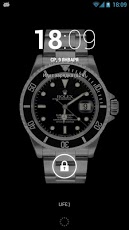
Widget and Live Wallpaper (displayed also on lock screens) to display Rolex Submariner watches - legendary models from famous Swiss watchmaker.Installation of Live Wallpaper:1 / Go to Home Screen2 / Long click to get menu3 / Choose Wallpaper, than Live Wallpaper4 / Choose Rolex SubmarinerYou can configure second hand movement mode and color of the background. On most models this wallpaper will be displayed on lock screen as well.How to install the widget: 1. Go to home screen. 2. Long touch the screen (2 seconds). 3. Choose Widgets. 4. Choose Rolex Submariner Watch Widget 2x3 or 4x3.When install you have option to enable displaying second hand (please disable if any performance issues), choose quartz style of movement (one per second) or chronograph movement (maximally identical to real mechanic watches).Explanation about permissions:1 / android.permission.RECEIVE_BOOT_COMPLETED - we need this permission to run widget and related services immediately after booting.2 / android.permission.GET_TASKS - to decrease power usage we check active task and activate background service only at moments it really necessary. With this new feature we decreased power usage in several times.
About Rolex Submariner Watch
The company that develops Rolex Submariner Watch is 2K-Group. The latest version released by its developer is 3.1. This app was rated by 1 users of our site and has an average rating of 5.0.
To install Rolex Submariner Watch on your Android device, just click the green Continue To App button above to start the installation process. The app is listed on our website since 2013-01-09 and was downloaded 73 times. We have already checked if the download link is safe, however for your own protection we recommend that you scan the downloaded app with your antivirus. Your antivirus may detect the Rolex Submariner Watch as malware as malware if the download link to com.swisswatchesbook.rolex.submariner.widget is broken.
How to install Rolex Submariner Watch on your Android device:
- Click on the Continue To App button on our website. This will redirect you to Google Play.
- Once the Rolex Submariner Watch is shown in the Google Play listing of your Android device, you can start its download and installation. Tap on the Install button located below the search bar and to the right of the app icon.
- A pop-up window with the permissions required by Rolex Submariner Watch will be shown. Click on Accept to continue the process.
- Rolex Submariner Watch will be downloaded onto your device, displaying a progress. Once the download completes, the installation will start and you'll get a notification after the installation is finished.
Program Details
System requirements
Download information
Pricing
Version History
version 3.1
posted on 2013-01-09
Several fixes and updates
